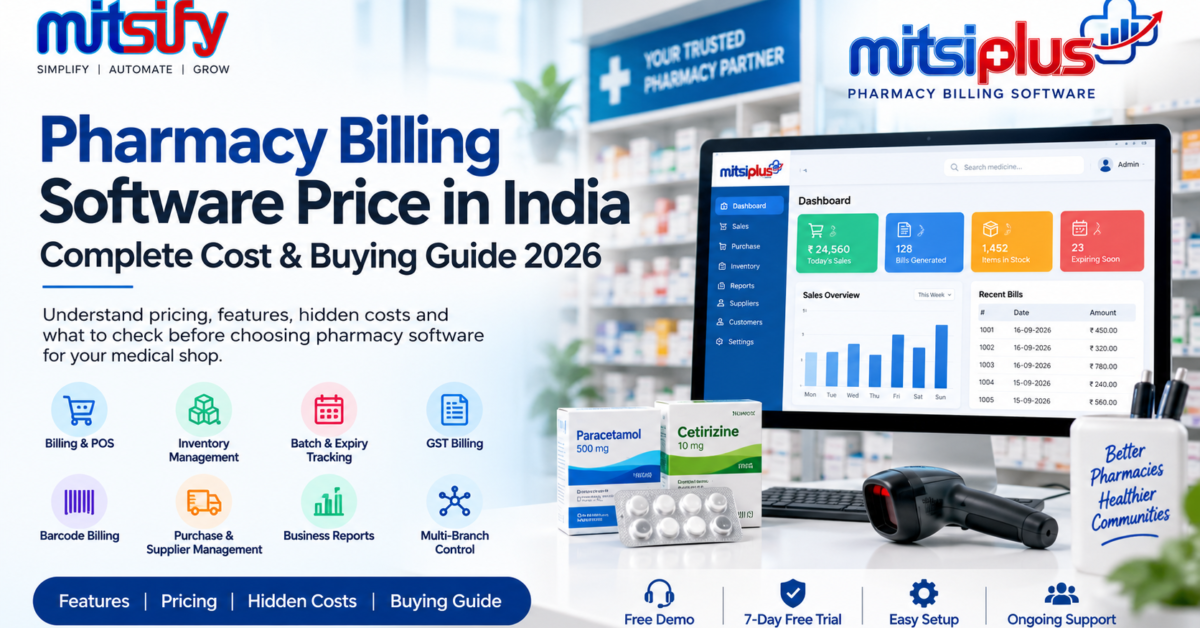
Choosing the right pharmacy billing software is an important decision for medical shops and pharmacies. The price of pharmacy billing software in India can vary depending on the features, number of users, branches, deployment type, support and additional services included.
Instead of looking only at the software price, pharmacy owners should also understand what is included in the package and whether there are additional costs for data migration, training, support, users or branches.
This guide explains pharmacy billing software price in India, different pricing models, features to look for, hidden costs and what to check before choosing software for your medical shop.
How Much Does Pharmacy Billing Software Cost in India?
The cost of pharmacy billing software in India depends on the type of software and the features required by the pharmacy.
A basic billing solution may focus mainly on sales billing and GST invoicing, while a complete pharmacy management system can include inventory, batch tracking, expiry management, barcode billing, purchases, supplier management, reports and multi-user access.
The total cost can also depend on:
- Number of users
- Number of branches
- Billing and POS features
- Inventory management
- Batch-wise stock tracking
- Expiry management
- GST billing
- Barcode billing
- Purchase management
- Supplier management
- Reports
- Data migration
- Staff training
- Technical support
- Desktop or cloud deployment
Therefore, pharmacy owners should compare the total value and included services, rather than comparing only the initial software price.
Pharmacy Billing Software Pricing Models
Pharmacy billing software is generally available through different pricing models. Understanding these models can help medical shop owners choose software that matches their business requirements.
One-Time Pharmacy Billing Software
With a one-time licence model, the software is purchased by paying an upfront amount.
Depending on the provider, additional charges may apply for future support, updates, maintenance or additional services.
Before purchasing a one-time licence, ask the software provider:
- Is technical support included?
- Are software updates included?
- Is data backup included?
- Is there an annual maintenance charge?
- Are additional users charged separately?
- Are additional branches charged separately?
Monthly or Annual Subscription
Subscription-based pharmacy software requires a recurring monthly or annual payment.
This model may include software updates, support and other services depending on the provider.
Before choosing a subscription plan, check:
- Monthly or annual cost
- Number of users included
- Number of branches included
- Storage or backup limits
- Support availability
- Renewal price
- Additional module charges
Free Trial vs Free Pharmacy Software
A free trial and completely free software are not the same.
A free trial allows a pharmacy owner to test the software before making a purchase. A free software plan may have limitations on features, users, transactions or support.
A trial can be useful for checking:
- Billing speed
- Medicine search
- Inventory management
- Batch and expiry tracking
- GST billing
- Barcode billing
- Reports
- Ease of use
What Affects Pharmacy Billing Software Price?
Different pharmacies have different requirements, so software pricing can vary.
Billing and POS
Fast medicine search, barcode scanning, sales billing, returns and payment handling are important for daily pharmacy operations.
Inventory Management
A pharmacy may need to manage thousands of medicines and different stock movements. Inventory features can include stock tracking, purchase entry, stock adjustments and stock reports.
Batch and Expiry Management
Medicine stock often needs batch-wise tracking and expiry monitoring.
Software with batch and expiry management can help pharmacy owners identify stock approaching expiry and maintain better inventory control.
GST Billing
Pharmacy billing software may include GST invoices, GST reports and other tax-related billing requirements.
Barcode Billing
Barcode billing can make medicine identification and billing faster by reducing manual product selection.
Purchase Management
Purchase management helps pharmacies record purchases from suppliers and maintain purchase history.
Supplier Management
Supplier-related features can include supplier balances, payments, purchase history and outstanding amounts.
Reports
Business reports help pharmacy owners understand sales, purchases, stock and other business activities.
Multi-User and Multi-Branch Management
Growing pharmacy businesses may require multiple users or branches.
Before purchasing software, check whether these features are included in the quoted price or charged separately.
Hidden Costs to Check Before Buying Pharmacy Software
The advertised software price may not always represent the complete cost.
Before purchasing pharmacy billing software, ask about the following additional costs.
Data Migration Charges
If you are moving from existing software, ask whether your existing medicine, customer, supplier and stock data can be migrated.
Also check whether data migration is included in the software price.
Staff Training Charges
Your employees may need training to use billing, inventory, purchase and reporting features.
Check whether onboarding and staff training are included.
Additional User Charges
Some software providers may charge separately when you add more users.
Ask how many users are included in your plan.
Additional Branch Charges
If you operate multiple medical shops, check whether branch management is included.
Ask whether every additional branch requires a separate payment.
Annual Maintenance or Renewal
For software purchased with a one-time licence, check whether there is an annual maintenance or renewal fee.
Support Charges
Technical support may be included in some plans and charged separately in others.
Always confirm the support terms before purchasing.
Hardware Costs
Software is only one part of a pharmacy billing setup.
Depending on your requirements, you may also need:
- Barcode scanner
- Receipt printer
- Computer
- Barcode printer
- Cash drawer
- Internet connection
These hardware costs should be considered separately from the software price.
Desktop vs Cloud Pharmacy Billing Software
Pharmacy owners may also need to decide between desktop-based and cloud-based software.
| Feature | Desktop Software | Cloud Software |
|---|---|---|
| Internet requirement | Depends on software | Usually required |
| Data access | Usually from configured systems | Can be available across supported devices |
| Updates | May require installation | Usually managed online |
| Backup | Depends on setup | Often includes cloud-based options |
| Multi-location access | Depends on software | Often designed for remote access |
| Pricing | Often licence-based | Often subscription-based |
The right option depends on the pharmacy’s workflow, connectivity, number of locations and business requirements.
What Features Should Pharmacy Billing Software Include?
Before choosing software, pharmacy owners should check whether the essential features are included.
A complete pharmacy billing solution may include:
- Fast pharmacy billing
- Medicine search
- Barcode billing
- Inventory management
- Batch-wise stock management
- Expiry tracking
- GST billing
- Purchase management
- Supplier management
- Customer management
- Payment and ledger management
- Sales reports
- Purchase reports
- Stock reports
- Multi-user access
- Multi-branch management
- Data backup
- Business reports
The exact features and availability can vary between software providers.
MITSIPLUS Pharmacy Billing Software Pricing
MITSIPLUS Pharmacy Billing Software is designed for medical shops and pharmacies that need billing, inventory and business management from one platform.
MITSIPLUS Launch Offer
₹5,500
Regular Price: ₹11,000
The current MITSIPLUS product page also includes:
- Free data migration
- Onboarding
- Masters setup
- Staff training
- 7-day free trial
- Pharmacy billing
- Inventory management
- Batch-wise tracking
- Expiry management
- GST invoicing
- Barcode billing
- Purchase management
- Supplier management
- Multi-branch control
- Business reports
The software supports both browser and desktop applications, allowing pharmacies to use the setup that fits their workflow.
What Is Included in MITSIPLUS?
MITSIPLUS brings important pharmacy operations together in one system.
Pharmacy Billing
Create fast and accurate bills with medicine search and barcode billing.
Inventory Management
Track pharmacy stock and monitor stock movements from purchases to sales.
Batch and Expiry Tracking
Manage medicines batch-wise and monitor expiry dates to reduce the risk of unnoticed expired stock.
GST Billing
Create GST-compliant pharmacy invoices and access relevant business reports.
Purchase and Supplier Management
Manage purchases, supplier balances and supplier payments from one system.
Business Reports
Access sales, purchase, stock and other business reports to understand daily pharmacy operations.
Free Data Migration
MITSIPLUS currently includes free data migration as part of the launch offer.
Staff Training
Onboarding and staff training are included to help pharmacy teams get started with the software.
How to Choose Pharmacy Billing Software Based on Your Business
Different pharmacies may need different software capabilities.
For a Small Medical Shop
Focus on:
- Fast billing
- GST billing
- Inventory
- Batch and expiry
- Barcode
- Basic reports
For a Growing Pharmacy
Look for:
- Inventory management
- Purchase management
- Supplier management
- Barcode billing
- Multiple users
- Detailed reports
- Expiry tracking
For a Multi-Branch Pharmacy
Important requirements may include:
- Multi-branch management
- User permissions
- Centralized reporting
- Stock management
- Branch-level controls
- Data backup
- Business reports
Questions to Ask Before Buying Pharmacy Billing Software
Before purchasing pharmacy billing software, ask the provider these questions:
- Is GST billing included?
- Can I track medicine batches?
- Does the software provide expiry tracking?
- Is barcode billing included?
- Is inventory management included?
- Is purchase management included?
- Is supplier management included?
- Is data migration included?
- Is staff training included?
- How many users are included?
- Can I add multiple branches?
- Is there an annual renewal charge?
- Is technical support included?
- Is there a free trial?
- What happens to my data if I stop using the software?
These questions can help you understand the actual pharmacy billing software cost before making a purchase.
Why Pharmacy Owners Should Compare Total Cost
The cheapest software is not necessarily the most suitable option for every pharmacy.
A pharmacy owner should consider the complete package, including:
Software + Features + Support + Data Migration + Training + Updates + Users + Branches
For example, software with a lower initial price may require separate charges for migration, training or support. Another solution may include these services in its package.
Therefore, compare the complete cost and included features before making a decision.
Start With a Pharmacy Billing Software Demo
Before purchasing pharmacy billing software, testing the software through a live demo or free trial can help you understand how it works in a real pharmacy environment.
With MITSIPLUS, pharmacy owners can:
- Book a Free Live Demo
- See pharmacy billing in action
- Understand inventory and batch management
- Explore reports
- Check the workflow with their team
- Start a 7-Day Free Trial
Book a Free MITSIPLUS Pharmacy Billing Demo
Frequently Asked Questions
How much does pharmacy billing software cost in India?
Pharmacy billing software prices in India vary depending on features, users, branches, deployment model, support and additional services. Some providers offer subscription plans, while others offer one-time licence models or free trials.
What is the price of medical store billing software?
The price of medical store billing software depends on the software features and pricing model. Pharmacy owners should compare billing, inventory, batch and expiry, GST, barcode, purchase, supplier management and reporting features along with the total cost.
Is pharmacy billing software available with a free trial?
Yes. Some pharmacy software providers offer free trials so medical shop owners can test the software before purchasing. MITSIPLUS currently offers a 7-day free trial without requiring a card.
What features should pharmacy billing software include?
Important features can include billing, inventory management, batch-wise tracking, expiry management, GST billing, barcode billing, purchase management, supplier management and business reports.
Is one-time pharmacy software better than subscription software?
Both pricing models have different advantages and costs. The right choice depends on the pharmacy’s requirements, preferred payment model, support needs, updates and long-term software costs.
Does pharmacy billing software support GST billing?
Many pharmacy billing solutions include GST billing and GST-related reports. Pharmacy owners should verify the exact GST features included in the software they are considering.
Does pharmacy software track medicine batch and expiry dates?
Yes, pharmacy-focused billing and inventory software can provide batch-wise stock tracking and expiry management. These features are useful for managing medicine inventory.
Is data migration included with MITSIPLUS?
MITSIPLUS currently provides free data migration as part of its launch offer, along with onboarding and staff training.
Conclusion
Choosing pharmacy billing software should not be based on price alone. Pharmacy owners should compare the features, support, data migration, training, users, branches and other costs involved before selecting a solution.
A suitable pharmacy billing system should make daily billing easier while also helping manage inventory, batches, expiry dates, purchases, suppliers, GST and business reports.
For pharmacies looking for an all-in-one solution, MITSIPLUS Pharmacy Billing Software provides these capabilities along with a free live demo and 7-day free trial.